
# Warehouse Operations Explanation (Inventory, Transfer, Requisitions, and Supply Orders) ## Overview Warehouse operations in SmartPro include several key processes: - **Inventory Management**: Tracking and counting stock - **Stock Transfers**: Moving items between warehouses - **Requisitions**: Processing material requisition requests - **Supply Orders**: Managing incoming supplies and deliveries --- ## 1. Inventory (الجرد) ### Definition Inventory is the process of physically counting and verifying warehouse stock to ensure records match actual quantities. ### Key Features - Count actual stock on hand - Compare with system records - Identify discrepancies and shortages - Update inventory balances - Generate adjustment journals ### Steps 1. Create new inventory count 2. Assign counting team 3. Count items by location 4. Enter quantities in system 5. Review variances 6. Post adjustments to general ledger ### Important Notes - Conduct inventory regularly (monthly, quarterly, or annually) - Freeze transactions during counting to avoid data conflicts - Use barcode scanning for accuracy - Document all discrepancies --- ## 2. Stock Transfer (التحويل) ### Definition Transfer is the movement of inventory between warehouses or locations within your organization. ### Types of Transfers - **Inter-warehouse Transfer**: Between different warehouses - **Internal Transfer**: Between storage locations in the same warehouse - **Bin Transfer**: Between bins within a location ### Process Flow 1. Create transfer request 2. Select source warehouse/location 3. Select destination warehouse/location 4. Enter items and quantities 5. Add reference notes 6. Approve transfer 7. Execute transfer (physically move goods) 8. Receive and confirm at destination ### Key Information Required - Transfer date - Item code and description - Quantity - Unit of measure - Cost center (if applicable) - Reference document ### Benefits - Maintain optimal stock levels across locations - Balance inventory between branches - Support sales fulfillment from nearest warehouse - Reduce shipping costs --- ## 3. Requisitions (أوامر الصرف) ### Definition A requisition is an internal request to withdraw materials from inventory for production, consumption, or distribution. ### Types of Requisitions - **Production Requisition**: For manufacturing needs - **Consumption Requisition**: For operational use - **Sales Requisition**: For fulfilling customer orders - **Return Requisition**: For damaged or defective items ### Requisition Process 1. Create requisition document 2. Specify warehouse and location 3. List required items with quantities 4. Add cost center or project code 5. Submit for approval 6. Pick items from warehouse 7. Confirm picking 8. Post to inventory and accounts ### Required Fields - Requisition date - Item code and description - Quantity needed - Unit of measure - Warehouse/location - Cost center or project - Purpose/notes - Approval authority ### Workflow ``` Request Created → Approved → Picked → Confirmed → Posted ``` --- ## 4. Supply Orders (أوامر التوريد) ### Definition Supply orders are purchase requisitions or purchase orders placed with vendors to replenish warehouse stock. ### Types of Supply Orders - **Direct Purchase Order**: From vendor to warehouse - **Internal Requisition to PO**: From internal request to purchase - **Blanket Order**: Recurring orders with same vendor - **Purchase Requisition**: Internal request converted to purchase ### Supply Order Process 1. Analyze inventory levels 2. Determine reorder quantities 3. Create purchase order 4. Select vendor and terms 5. Enter item details and quantities 6. Set delivery date and location 7. Send to vendor for approval 8. Track delivery status 9. Receive goods 10. Match with purchase order 11. Post to inventory ### Key Information - Vendor details - Item code and description - Quantity ordered - Unit price and currency - Delivery date and location - Payment terms - Purchase order reference - Cost allocation ### Important Considerations - Set minimum and maximum stock levels - Calculate economic order quantity (EOQ) - Consider lead times - Monitor vendor performance - Manage purchase discounts --- ## Integration Between Operations These processes work together seamlessly: | Operation | Input | Output | Next Step | |-----------|-------|--------|-----------| | Inventory | Physical count | Discrepancies | Adjustment posting | | Transfer | Requisition | Stock movement | Confirmation | | Requisition | Material need | Withdrawal request | Approval | | Supply Order | Low stock level | Purchase request | Vendor receipt | --- ## Best Practices - **Regular Counts**: Perform cycle counts monthly - **Documentation**: Maintain clear records for all transactions - **Approval Workflows**: Enforce proper authorization levels - **Timely Recording**: Post transactions promptly - **Accuracy**: Use barcodes and system validation - **Reconciliation**: Match physical counts with system records - **Cost Control**: Monitor requisition and purchase spending - **Vendor Management**: Track supplier performance and delivery times --- ## Common Issues and Solutions | Issue | Cause | Solution | |-------|-------|----------| | Stock discrepancies | Unrecorded transfers | Use system for all movements | | Expired inventory | Poor FIFO tracking | Implement expiration date tracking | | Delayed requisitions | Lack of approval | Set SLA for approvals | | Overstocking | Poor forecasting | Use demand planning tools | | Stockouts | Inadequate reorder points | Adjust minimum stock levels |
1 min read#70Video included
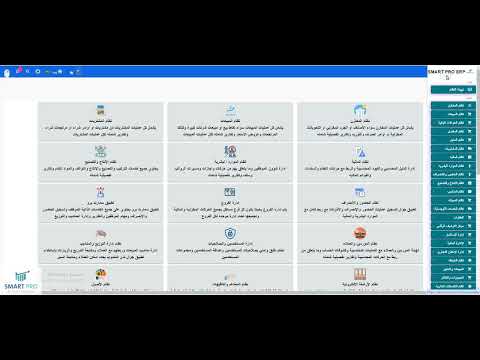
يوضح الفيديو شرح الية العمليات على المخازن مثل الجرد المخزني او التحويل بين المخازن او امر التوريد والصرف المخزني ويتم الوصول الى العمليات على المخازن من خلال نظام المخازن
Liked this guide?
Try SmartPro on your own data.
Live demo in 30 minutes, no credit card.